
 chibiham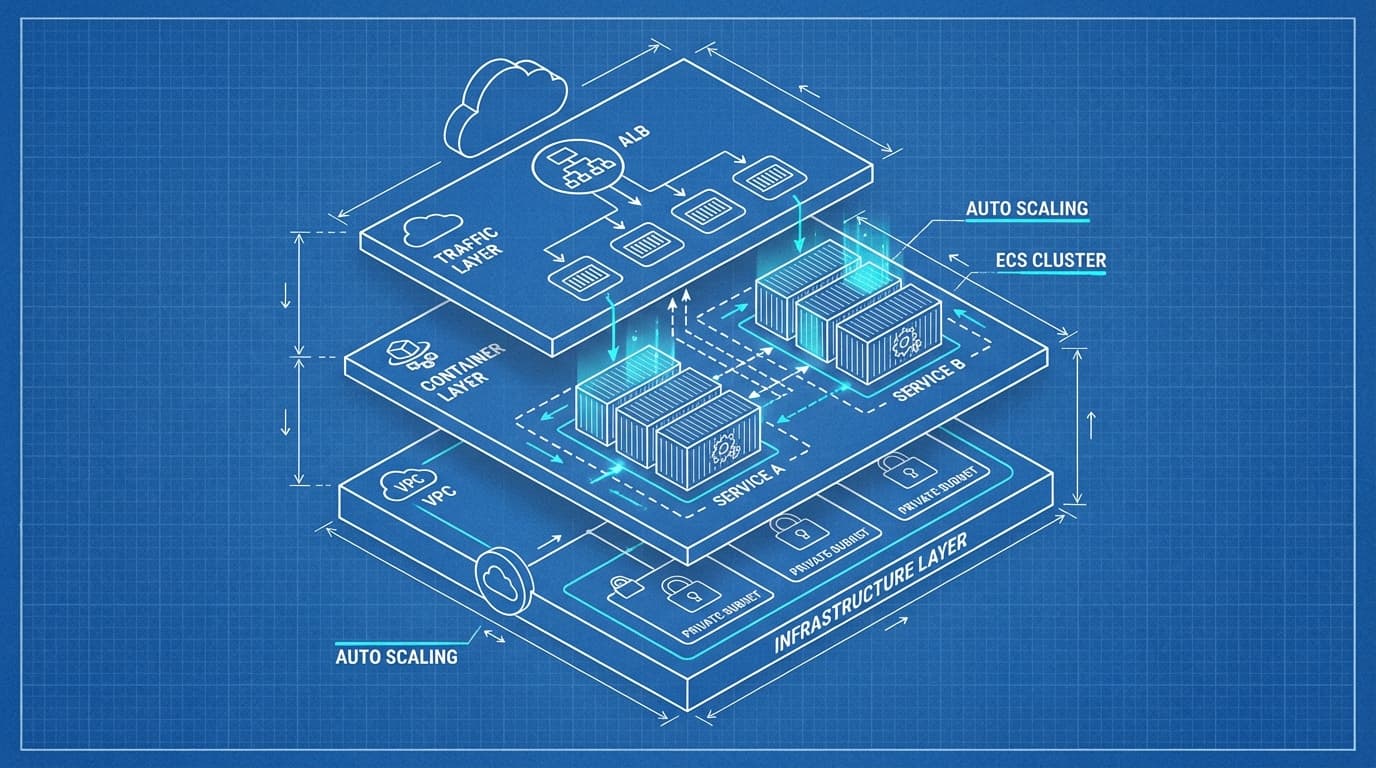
When building applications with ECS Fargate, you might feel uncertain: "Do I have all the configurations I need?" With so many related resources, it's hard to tell what's essential versus optional.
This article comprehensively organizes the resources needed for ECS Fargate, giving you a clear picture of the whole system. The goal is to reach a state where you can confidently build from scratch.
Understanding the Three-Layer Structure
ECS Fargate resources become easier to understand when divided into three layers.
┌─────────────────────────────────────────┐
│  Traffic Layer                          │
│  Route53 → ALB → TargetGroup            │
├─────────────────────────────────────────┤
│  Container Layer                        │
│  Cluster → Service → Task → Container   │
├─────────────────────────────────────────┤
│  Foundation Layer                       │
│  VPC, Subnet, SG, IAM, ECR, Logs        │
└─────────────────────────────────────────┘
- Foundation Layer: Network, permissions, image storage—the base for containers to run
- Container Layer: ECS-specific resources handling task definition and execution
- Traffic Layer: The path that delivers external requests to containers
Build from the bottom up. When writing CloudFormation, keeping this order in mind helps manage dependencies effectively.
Overall Architecture Diagram
Here's a practical web application configuration visualized:
Solid lines represent traffic flow, dotted lines represent resource references.
Foundation Layer Resources
VPC / Subnet / Internet Gateway / NAT Gateway
The network foundation resource group.
| Resource | ARN Format | Role |
|---|---|---|
| VPC | arn:aws:ec2:{region}:{account}:vpc/{vpc-id} | Virtual network boundary |
| Subnet | arn:aws:ec2:{region}:{account}:subnet/{subnet-id} | Network segment within VPC |
| Internet Gateway | arn:aws:ec2:{region}:{account}:internet-gateway/{igw-id} | Connection point between VPC and internet |
| NAT Gateway | arn:aws:ec2:{region}:{account}:natgateway/{nat-id} | Outbound traffic from private subnets |
Configuration Points:
- Public Subnet: Place ALB and NAT Gateway here. Has route to Internet Gateway
- Private Subnet: Place ECS tasks here. External communication via NAT Gateway
Why place tasks in private subnets? For security. While you can assign public IPs directly to tasks, production environments typically allow access only through ALB.
Multi-AZ Configuration: Deploy subnets in at least 2 AZs for availability. This is also an ALB requirement.
Security Group
| Resource | ARN Format | Role |
|---|---|---|
| Security Group | arn:aws:ec2:{region}:{account}:security-group/{sg-id} | Inbound/outbound traffic control |
Required Security Groups:
-
ALB Security Group:
- Inbound: 80/443 from 0.0.0.0/0
- Outbound: Traffic to ECS task SG
-
ECS Task Security Group:
- Inbound: Container port (e.g., 8080) from ALB SG
- Outbound: 0.0.0.0/0 (external API calls, ECR image pulls, etc.)
Using security group references (specifying SG IDs) enables flexible configuration without depending on IP addresses.
IAM Role
ECS uses two types of IAM roles. This is a common point of confusion.
| Role | ARN Format | Purpose |
|---|---|---|
| Task Execution Role | arn:aws:iam::{account}:role/{role-name} | Used by ECS agent. Image pulls from ECR, writing to CloudWatch Logs |
| Task Role | arn:aws:iam::{account}:role/{role-name} | Used by application in container. S3 access, DynamoDB operations, etc. |
┌─────────────────────────────────────────────────┐
│  ECS Agent (AWS managed)                        │
│  └─ Uses Task Execution Role                    │
│     ・Pull images from ECR                      │
│     ・Send logs to CloudWatch Logs              │
│     ・Retrieve secrets from Secrets Manager     │
├─────────────────────────────────────────────────┤
│  Container (Application)                        │
│  └─ Uses Task Role                              │
│     ・Access S3 buckets                         │
│     ・Read/write DynamoDB                       │
│     ・Send messages to SQS                      │
└─────────────────────────────────────────────────┘
Policies needed for Task Execution Role:
AmazonECSTaskExecutionRolePolicy(AWS managed policy)- When using Secrets Manager:
secretsmanager:GetSecretValue - When using Systems Manager Parameter Store:
ssm:GetParameters
Policies needed for Task Role:
- Access permissions for AWS resources your application needs
- Design following the principle of least privilege
ECR (Elastic Container Registry)
| Resource | ARN Format | Role |
|---|---|---|
| ECR Repository | arn:aws:ecr:{region}:{account}:repository/{repo-name} | Container image storage and distribution |
URI format when specifying images in task definitions:
{account}.dkr.ecr.{region}.amazonaws.com/{repo-name}:{tag}
ECR is referenced directly from task definitions and pulled using Task Execution Role permissions.
CloudWatch Logs
| Resource | ARN Format | Role |
|---|---|---|
| Log Group | arn:aws:logs:{region}:{account}:log-group:{log-group-name} | Container log aggregation and storage |
Specify in logConfiguration within the task definition. Create log groups in advance or use the autoCreateGroup option.
"logConfiguration": {
    "logDriver": "awslogs",
    "options": {
        "awslogs-group": "/ecs/my-app",
        "awslogs-region": "ap-northeast-1",
        "awslogs-stream-prefix": "ecs"
    }
}
Container Layer Resources
ECS Cluster
| Resource | ARN Format | Role |
|---|---|---|
| Cluster | arn:aws:ecs:{region}:{account}:cluster/{cluster-name} | Logical grouping of tasks and services |
A cluster is like a "box"—it doesn't have many configuration options itself. For Fargate, FARGATE and FARGATE_SPOT automatically become available as capacity providers.
Container Insights: Enabling this enhances metrics and logs but incurs additional costs.
Task Definition
| Resource | ARN Format | Role |
|---|---|---|
| Task Definition | arn:aws:ecs:{region}:{account}:task-definition/{family}:{revision} | Container blueprint |
Task definitions are the core ECS resource. Here are the key configuration items:
Task-level settings:
| Item | Description |
|---|---|
family | Task definition family name. Unit for revision management |
requiresCompatibilities | Specify ["FARGATE"] |
networkMode | Fixed to awsvpc for Fargate |
cpu | Total task CPU (256, 512, 1024, 2048, 4096) |
memory | Total task memory (constraints based on cpu combination) |
executionRoleArn | Task Execution Role ARN |
taskRoleArn | Task Role ARN (when app uses AWS resources) |
Container definition settings:
| Item | Description |
|---|---|
name | Container name |
image | ECR image URI |
portMappings | Ports to expose |
environment | Environment variables |
secrets | Values from Secrets Manager/Parameter Store |
logConfiguration | Log settings |
healthCheck | Container-level health check |
essential | If true, task stops when this container stops |
CPU/Memory combination constraints:
Fargate has fixed valid combinations. For example:
- 256 CPU: 512, 1024, 2048 MB
- 512 CPU: 1024–4096 MB
- 1024 CPU: 2048–8192 MB
- Increases progressively thereafter
Service
| Resource | ARN Format | Role |
|---|---|---|
| Service | arn:aws:ecs:{region}:{account}:service/{cluster-name}/{service-name} | Task execution, maintenance, and scaling |
A service is responsible for "keeping the specified number of tasks running." Key settings:
| Item | Description |
|---|---|
taskDefinition | Task definition ARN to use |
desiredCount | Number of tasks to launch |
launchType | Specify FARGATE |
networkConfiguration | Subnets, security groups, public IP assignment |
loadBalancers | Association with target groups |
deploymentConfiguration | Rolling update settings |
enableExecuteCommand | Whether to enable ECS Exec |
networkConfiguration:
"networkConfiguration": {
    "awsvpcConfiguration": {
        "subnets": ["subnet-xxx", "subnet-yyy"],
        "securityGroups": ["sg-xxx"],
        "assignPublicIp": "DISABLED"
    }
}
Use assignPublicIp: DISABLED when placing in private subnets.
Traffic Layer Resources
Application Load Balancer
| Resource | ARN Format | Role |
|---|---|---|
| Load Balancer | arn:aws:elasticloadbalancing:{region}:{account}:loadbalancer/app/{name}/{id} | Traffic entry point, SSL termination |
| Listener | arn:aws:elasticloadbalancing:{region}:{account}:listener/app/{lb-name}/{lb-id}/{listener-id} | Request reception per port |
| Listener Rule | arn:aws:elasticloadbalancing:{region}:{account}:listener-rule/app/{lb-name}/{lb-id}/{listener-id}/{rule-id} | Routing based on path or host |
| Target Group | arn:aws:elasticloadbalancing:{region}:{account}:targetgroup/{name}/{id} | Health checks, target management |
Configuration relationship:
ALB
 └─ Listener (443)
     └─ Listener Rule (path: /api/*)
         └─ Target Group
             └─ ECS Tasks (dynamically registered)
Target Group configuration points:
| Item | Description |
|---|---|
targetType | Specify ip for Fargate (not instance) |
protocol | HTTP or HTTPS |
port | Container port |
healthCheckPath | Path for health checks |
deregistrationDelay | Wait time when deregistering targets (affects deployment speed) |
ECS Service references the Target Group and automatically registers/deregisters task IP addresses.
Route53 / ACM
| Resource | ARN Format | Role |
|---|---|---|
| Hosted Zone | arn:aws:route53:::hostedzone/{zone-id} | DNS management |
| Certificate | arn:aws:acm:{region}:{account}:certificate/{cert-id} | SSL/TLS certificate |
For HTTPS support:
- Issue certificate with ACM (DNS validation is easiest)
- Associate certificate with ALB HTTPS listener
- Create Alias record to ALB in Route53
Use Case Configuration Variations
Web Application (Primary)
The configuration explained so far. Receives HTTP requests via ALB.
Internet → Route53 → ALB → ECS Service → Tasks
Required resources: VPC suite, ALB suite, ECS suite, IAM, ECR, CloudWatch Logs
Batch Processing (Scheduled Execution)
Schedule execution pattern using EventBridge (formerly CloudWatch Events).
EventBridge Rule → ECS RunTask → Task (terminates after execution)
Differences from web app:
- ALB and Target Group not needed
- Call
RunTaskdirectly from EventBridge instead of ECS Service - IAM role needed for EventBridge Rule to execute ECS tasks
Additional resources needed:
| Resource | ARN Format | Role |
|---|---|---|
| EventBridge Rule | arn:aws:events:{region}:{account}:rule/{rule-name} | Schedule definition |
| EventBridge Target Role | arn:aws:iam::{account}:role/{role-name} | Permission to execute RunTask |
Internal API (Service Connect / Cloud Map)
Internal API pattern accessed only from other ECS services.
ECS Service A → Service Connect → ECS Service B (internal API)
Differences from web app:
- ALB not needed (or use Internal ALB)
- Use Service Connect or Cloud Map (Service Discovery)
- Communication within same VPC
Service Connect: ECS Service Connect (introduced 2022) simplifies service-to-service communication. Enables access by service name.
Additional resources needed:
| Resource | ARN Format | Role |
|---|---|---|
| Service Connect Namespace | arn:aws:servicediscovery:{region}:{account}:namespace/{namespace-id} | Service namespace |
Worker (SQS Integration)
Pattern for retrieving and processing messages from SQS.
SQS Queue → ECS Task (polling) → Processing
Differences from web app:
- ALB not needed
- Task Role needs SQS access permissions
- Application needs SQS polling logic
- Auto Scaling adjusts task count based on queue depth
Additional resources needed:
| Resource | ARN Format | Role |
|---|---|---|
| SQS Queue | arn:aws:sqs:{region}:{account}:{queue-name} | Message queue |
| Application Auto Scaling | - | Task count scaling |
Resource Dependencies
When building with CloudFormation, you need to be aware of resource creation order. Here's a diagram showing the main dependencies:
Reading the dependency diagram: Resources at the arrow's origin are referenced by resources at the arrow's destination. This means the origin resource must be created first.
Checklist
A checklist to verify "Do I have everything I need?"
Foundation Layer
- Created VPC
- Created Public Subnets (2+ AZs)
- Created Private Subnets (2+ AZs)
- Created Internet Gateway and attached to VPC
- Created NAT Gateway (or NAT Instance)
- Configured route tables correctly
- Public Subnet → Internet Gateway
- Private Subnet → NAT Gateway
- Created ALB security group
- Created ECS task security group
- Created Task Execution Role
- Created Task Role (if needed)
- Created ECR repository
- Created CloudWatch Logs log group
Container Layer
- Created ECS cluster
- Created task definition
- CPU/memory combination is valid
- Container image URI is correct
- Configured port mappings
- Added log configuration
- Set required environment variables/secrets
- Created ECS service
- Specified correct subnets
- Specified correct security groups
- Configured Target Group association
Traffic Layer (for web apps)
- Created ALB
- Created Target Group (targetType: ip)
- Created Listener
- For HTTPS support:
- Issued ACM certificate
- Associated certificate with HTTPS listener
- Created Route53 record (for custom domains)
Summary
This article organized ECS Fargate application resources into a three-layer structure.
- Foundation Layer: VPC, Subnet, Security Group, IAM Role, ECR, CloudWatch Logs
- Container Layer: Cluster, Task Definition, Service
- Traffic Layer: ALB, Target Group, Listener, Route53, ACM
Particularly confusing points:
- Two IAM Roles: Distinguishing Task Execution Role (for ECS agent) from Task Role (for app)
- Target Group Type: Use
iptype for Fargate - Network Configuration: Private subnet + NAT Gateway configuration is production-ready
Use the checklist to verify you have all necessary resources as you build.